Fax Port Configuration
The Fax Ports management view allows system administrators to control hardware fax channels and FoIP virtual ports, define port directions (Send, Receive, or Bidirectional), and customize handshake parameters.
Accessing Port Settings
- In the FaxCore Admin Panel, navigate to Network Settings > Fax Agent > Ports.
- The grid displays all ports currently registered to the selected FaxAgent:
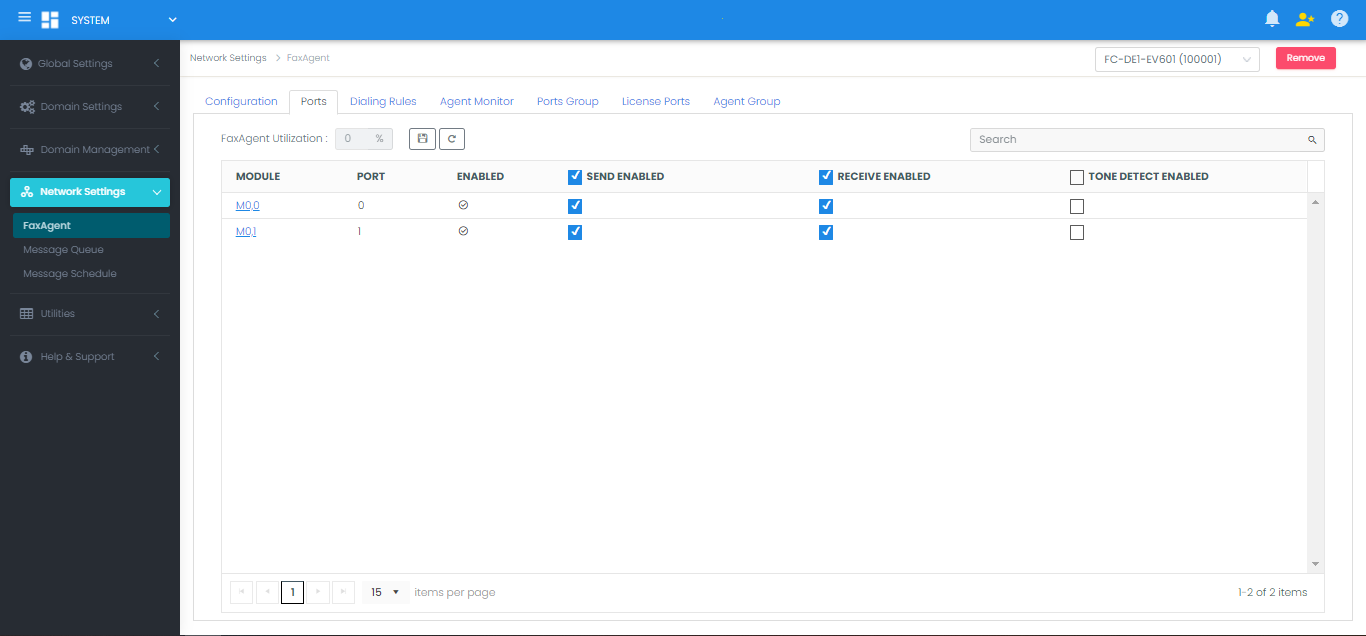
- Review the port capabilities:
- Enabled: Checkbox indicating whether the channel is active.
- Send Enabled: Allows outbound faxes to utilize this port.
- Receive Enabled: Allows inbound calls to be answered on this port.
- Tone Detect Enabled: Enables DTMF/tone detection for inward routing.
Editing Individual Port Parameters
To configure hardware-specific behavior or audio greetings for a channel:
- Click the specific Port Number link in the grid to open the Edit Port Configuration dialog:
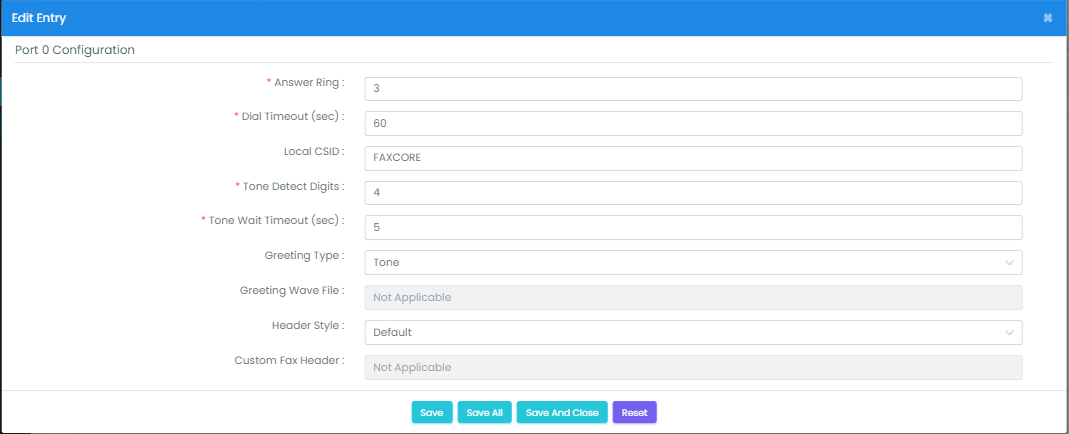
- Configure the following parameters:
| Parameter | Type / Format | Description |
|---|---|---|
| Answer Ring | Integer (e.g., 1–5) |
Number of rings the port allows before picking up an incoming call. |
| Dial Timeout (sec) | Seconds (e.g., 60) |
Maximum duration allowed before timing out an outbound dialing attempt. |
| Local CSID | String (up to 20 chars) | The Called Subscriber Identification string broadcast by this port. (Note: Overridden by Domain or User CSID settings if configured). |
| Tone Detect Digits | Integer (e.g., 4) |
Number of DTMF digits to collect for inbound routing. |
| Tone Wait Timeout (sec) | Seconds (e.g., 5) |
Maximum time to wait for DTMF digits before terminating collection. |
| Greeting Type | Selection | Audio behavior when answering: • None: Port answers silently without greeting. • Tone: Plays a standard Bong tone when call is answered. • WavFile: Plays a recorded .wav file (Brooktrout TR1034 hardware only). |
| Greeting Wav File | File Path | Full file path to the audio file if Greeting Type is set to WavFile. |
| Header Style | Selection | Specify whether outbound faxes transmit the Default FaxCore header or a Custom template header. |
- Click Save to update the selected port, or Save All to propagate these settings across all available ports on the agent.